Pleasantries Procreate Palette: A Calm Digital Color Guide
Creating digital art often begins with a single decision: choosing the right colors. For artists using the Procreate app on their iPad, iPad Pro, or iPhone, having a curated collection of hues can transform a blank canvas into a vibrant scene. The Pleasantries palette is designed specifically for this purpose, offering an instant digital download that brings a cohesive, calming aesthetic to your workflow. Whether you are a seasoned illustrator or just picking up an Apple Pencil for the first time, this resource provides a structured foundation for your creative projects.
What Is the Pleasantries Color Collection?
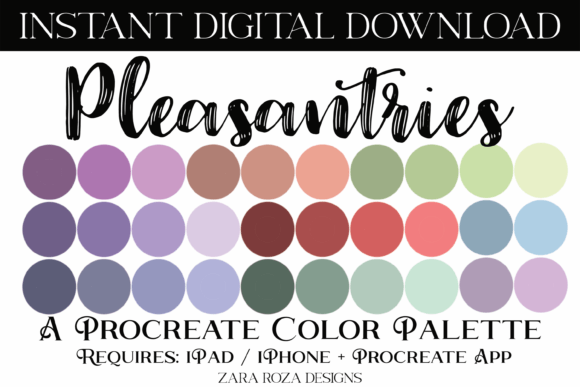
The Pleasantries palette is a specialized set of 30 color swatches packaged in a single .swatches file compatible with the Procreate application. Unlike random collections of bright neon shades, this palette focuses on a balanced spectrum that includes calm pastels, soft lights, and grounding dark tones. It features a harmonious blend of purple, blue, green, red, and brown shades, carefully selected to work well together without clashing.
This digital asset is not just a list of colors; it is a mood setter. The name "Pleasantries" reflects its intent to bring a sense of ease and visual comfort to your artwork. By removing the stress of color theory decisions, it allows you to focus entirely on composition, brushwork, and storytelling. The versatility of these 30 swatches means they can support a wide range of artistic styles, from delicate watercolor effects to bold comic book shading.
Why Choose a Curated Palette for Your Art?
One of the most common challenges for digital artists, especially beginners, is "color paralysis." Staring at a full spectrum wheel can be overwhelming, leading to hours spent adjusting sliders instead of drawing. The Pleasantries collection solves this by providing a pre-tested harmony. When you use a curated set, every color has been chosen to complement the others, ensuring that your final piece looks professional and intentional.
Furthermore, consistency is key in building a recognizable style. If you are creating content for social media, designing invitations, or illustrating characters for a story, maintaining a consistent color scheme helps your audience instantly recognize your work. This palette supports that goal by offering a reliable toolkit that works across different subjects, whether you are sketching natural hair textures, designing makeup looks, or painting landscapes.
Versatility Across Diverse Projects
The true value of the Pleasantries palette lies in its adaptability. While the tones are rooted in nature and earthiness, they are flexible enough to suit various themes and aesthetics:
- Fashion and Beauty: The rich browns and soft reds are perfect for illustrating natural hair tones, skin textures, and makeup applications. The subtle purples and blues add depth to fashion sketches without overpowering the subject.
- Celebrations and Events: From weddings and bridal showers to bachelorette parties and baby showers, these colors provide a sophisticated backdrop. They are ideal for designing digital planner decor, invitations, and festive holiday drawings for occasions like Christmas, Easter, Thanksgiving, and Valentine's Day.
- Character Design: Artists working in anime, manga, comics, cartoons, or chibi styles will find the pastel and light tones excellent for character skin and clothing, while the darker shades offer great options for shadows and outlines.
- Lifestyle Aesthetics: Whether your personal style leans towards boho, rustic, cute, floral, retro, or vintage, this palette bridges the gap. The earthy greens and warm reds evoke a rustic feel, while the soft pastels capture a cute or floral vibe.
How to Import Pleasantries Into Procreate
Getting started with your new colors is seamless thanks to the instant digital download format. Once you have purchased and downloaded the file, follow these simple steps to get the Pleasantries swatches ready in your Procreate app:
- Navigate to your Downloads folder on your iPad, iPhone, or iPad Pro. This is where the .swatches file is stored after purchase.
- Tap directly on the .swatches file. Your device should automatically recognize the file type and launch the Procreate app.
- You will see a confirmation message indicating that the file is importing, usually marked by a blue tick. This ensures the transfer was successful.
- Open Procreate and tap on the Palettes icon (the circle with two overlapping dots) in the top toolbar.
- Scroll down to the very bottom of your palette list. You will find your new Pleasantries palette waiting there, ready to be tapped and used immediately.
Once imported, you can save this palette to your favorites for quick access during future sessions. This process works identically on Procreate Pocket for iPhone users, ensuring you have your favorite colors wherever you go.
Practical Applications for Creators and Professionals
Beyond personal hobbyist use, the Pleasantries palette offers significant utility for professionals and entrepreneurs. Small business owners who create digital products, such as planners or printable art, can leverage these colors to maintain brand consistency. Bloggers and marketers looking to create custom graphics for articles or social media posts will appreciate how quickly they can generate on-brand visuals without needing advanced design software.
For educators teaching digital art classes, this palette serves as an excellent teaching tool. It demonstrates how a limited color range can produce complex and beautiful results, helping students understand value and hue relationships. Freelancers working on tight deadlines can also benefit, as the pre-selected tones reduce the time spent on color correction, allowing more time for client communication and project delivery.
Considerations Before You Start
While the Pleasantries palette is highly versatile, it is important to remember that it requires the Procreate app to function. Ensure your device—whether it is an older iPad model or the latest iPad Pro—is running a version of Procreate that supports .swatches files. Additionally, while the palette covers a wide range of tones, including those suitable for Halloween or New Year designs, you may occasionally want to mix in custom colors for specific highlights. However, for the vast majority of illustration, lettering, and decorative tasks, these 30 swatches provide a robust starting point.
Ultimately, the goal of any artist is to express their vision clearly and beautifully. By simplifying the technical aspects of color selection, the Pleasantries palette removes barriers between your imagination and the screen. With its blend of natural tones, festive potential, and aesthetic flexibility, it is a valuable addition to any digital artist's library. Happy drawing!